For payment pages
PCI DSS 4.0 and the browser layer
Requirements 6.4.3 and 11.6.1 cover the JavaScript on your payment pages, and both have been mandatory since March 2025. The attacks they answer compromise a payment page in the browser. HeaderHawk turns the reports browsers already send, and a daily scan of the pages you mark, into the evidence both ask for. What client-side security is covers the same layer without the compliance framing.
What each requirement asks, and what you get
Both apply to pages that take payment card data, including a page that only embeds a payment iframe. Each row is one thing the requirement asks, in our paraphrase of PCI DSS v4.0.1.
| Requirement | What HeaderHawk produces | Where it is | Plan |
|---|---|---|---|
| 6.4.3Every payment-page script is authorizedEvery script loaded and executed on a payment page is authorized. | What HeaderHawk producesEach script authorized or rejected, with a required written justification, who decided and when. Decisions are append-only, so nobody can edit the history. | Where it isScripts › Payment pages, and the 6.4.3 evidence file | PlanThe Professional and Business plans |
| 6.4.3Each script's integrity is assuredThe integrity of every script is assured. | What HeaderHawk producesThe hashes each script was seen with, the versions you pinned, and which scripts Chrome and Edge report running without Subresource Integrity. A policy for your payment pages that allows each pinned version by its hash. | Where it isScripts › Payment pages, and the 6.4.3 evidence file | PlanThe Professional and Business plans |
| 6.4.3An inventory, with a justification for eachAn inventory of all scripts is maintained, with a written justification for why each one is necessary. | What HeaderHawk producesThe scripts browsers reported on a payment page, or the daily scan found in its HTML, by hash. Each has the library and version where one can be named, its published advisories and the pages it ran on. | Where it isScripts › Payment pages, and the inventory file | PlanThe Professional and Business plans |
| 11.6.1Changes to headers and scripts are detectedA mechanism detects unauthorized modification to the payment page's security-impacting HTTP headers and script contents. | What HeaderHawk producesA daily scan of each payment page reports a security header added, removed or changed, a grade drop, and a script that is new, changed, gone or moved. On every plan, a policy change seen in the reports browsers send. | Where it isHeaders › Pages, Scripts › Payment pages | PlanThe Professional and Business plans; policy changes on every plan |
| 11.6.1Personnel are alertedIt alerts personnel when a change is detected. | What HeaderHawk producesAlerts to an email list, a Slack channel or a webhook, sent immediately or in a digest. Each delivery is recorded, with whether the destination accepted it. | Where it isAlerts › History, and the 11.6.1 evidence file | PlanEvery plan for email; the Team plan and above for Slack and webhooks; scan and script alerts on the Professional and Business plans |
| 11.6.1At least weeklyIt runs at least weekly, or at the frequency your targeted risk analysis defines. | What HeaderHawk producesA scan every day, and a readiness verdict that calls 11.6.1 not met while any payment page has gone 7 days without a complete scan. | Where it isCompliance › PCI DSS 4.0 | PlanThe Professional and Business plans; the readiness view on every plan |
What an assessor gets
On every plan, the Compliance page says whether 6.4.3 and 11.6.1 are met, partially met or not met for one site. It shows what each verdict rests on, what is missing, and the plan each missing step needs. It is a readiness view, not an attestation. Once the site has payment pages, it exports each requirement's evidence as a dated CSV. The script inventory export sits beside it, one row per script and payment page, with its status, justification, decider and date.
These are example files for a made-up shop, generated by the same code that writes the real ones, so they have the columns and caveats yours would.
6.4.3
Example 6.4.3 evidence (CSV)Each payment-page script with its status, who decided, when and why, and whether a browser is checking its integrity.
11.6.1
Example 11.6.1 evidence (CSV)Each payment page's last daily scan, every change a scan found in 30 days and whether it was alerted, and the rule covering each change type.
6.4.3
Example script inventory (CSV)One row per script and payment page: library and version, advisories, hashes seen and pinned, the decision and its justification.
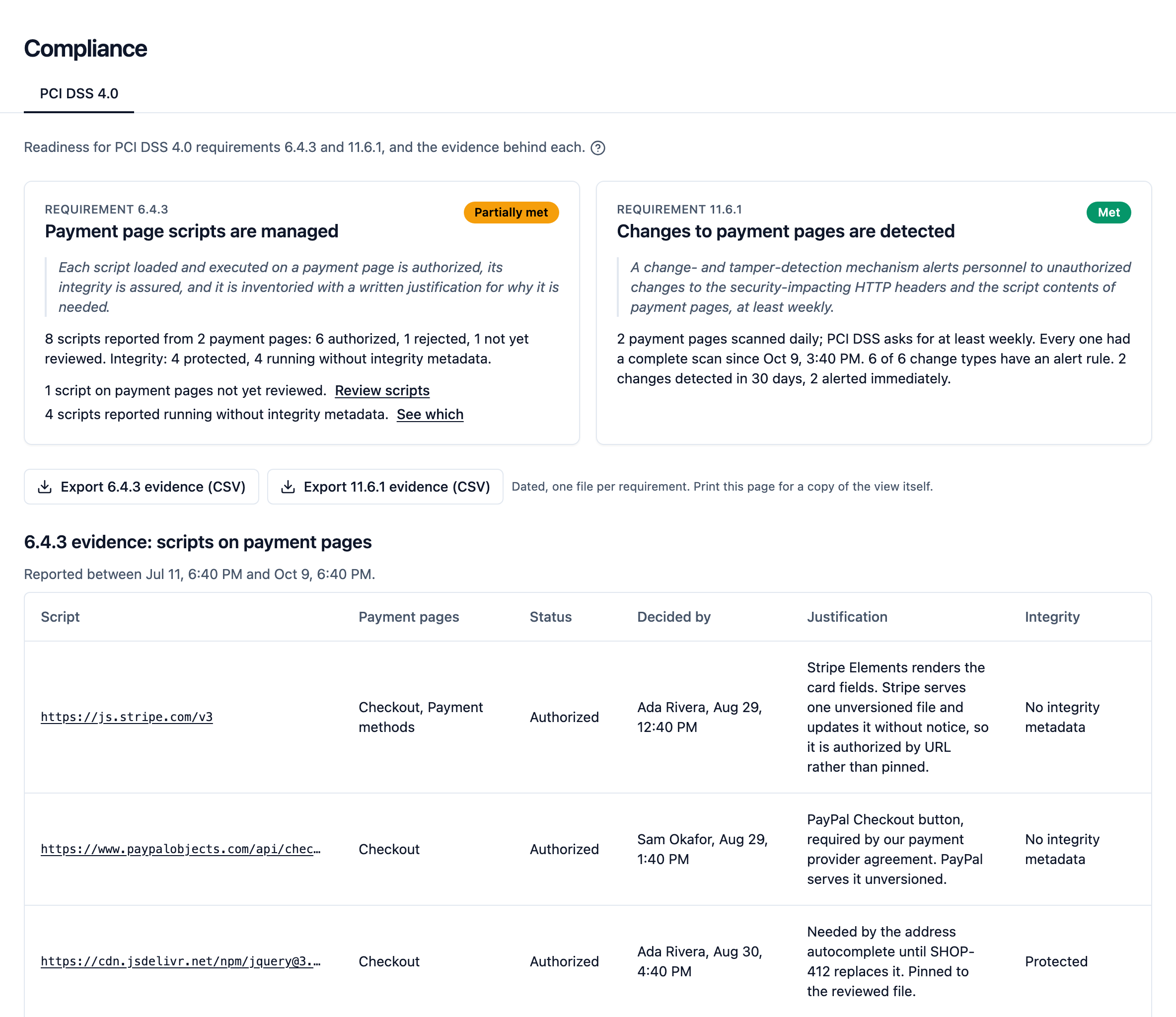
Everything else is reviewed in the dashboard: grouped violations with their counts and first- and last-seen times, the reports behind each group, and the policies in force when they arrived, with their history. For those, screenshots and a live walkthrough are the evidence. Decisions and the exports stay available after a downgrade. Report and scan history are deleted at the end of your plan's retention window.
| Plan | Report retention |
|---|---|
| Free | 15 days |
| Team | 30 days |
| Professional | 90 days |
| Business | 90 days |
11.6.1 asks for checks at least weekly, and the Free plan's 15-day window holds barely two. That shows the mechanism running, but it is a thin trail for an assessor. For evidence that must last a quarterly or annual review, use a paid plan's longer window or keep your own copies as you go. Pricing has each plan's window.
6.4.3
Building the inventory, and deciding about it
The hard part of 6.4.3 is usually finding out what is on the page, such as the tag manager that loads three more tags or the vendor script that pulls a second one from another origin. Only the browser sees the whole picture, and it reports two different signals.
What your policy would block, in every browser
Put a tight script-src on your payment page in Content-Security-Policy-Report-Only mode. Nothing breaks. Every script not on the allowlist reports itself, with the page it ran on, the directive it broke and, where the browser supplies them, the file and line it came from. HeaderHawk groups those reports, so a thousand hits from one script are one row with a count and first- and last-seen times. It is the broader signal, sent by every browser that supports CSP reporting.
What loaded, and which library it is
Add 'report-sha256' to script-src and Chrome and Edge send a hash for each script they fetch. When the hash matches a file in a published npm package version, the inventory names the library and version. On the Professional and Business plans it checks that version against published advisories, and a flag is about the version, not how your page uses it. The setup notes cover the header combination, which is easy to get wrong, and the script inventory has the detail.
Script URL        https://cdn.jsdelivr.net/npm/jquery@3.4.1/dist/jquery.min.js
Library           jquery
Library version   3.4.1
Identification    identified
Advisories        affected
Advisory IDs      GHSA-jpcq-cgw6-v4j6 (CVE-2020-11023)
                  GHSA-gxr4-xjj5-5px2 (CVE-2020-11022)
Fixed in          3.5.0
Hashes seen       sha256-CSXorXvZcTkaix6Yvo6HppcZGetbYMGWSFlBw8HfCJo=
Seen by           browsers and scan
Your decision about each one
Each script browsers report on your payment pages, or the daily scan finds in them, arrives in a review queue. Authorize or reject it with a written justification. An authorization either pins the versions you reviewed, so any other version counts as a change, or accepts any content from the URL, for a vendor that updates in place. Each decision is kept with who made it and when, and can only be followed by another, never edited or deleted.
When a new version first appears, HeaderHawk fetches it and keeps the file if its SHA-256 matches, so you can read the version a decision was about months later. Script authorization has the detail, and the evidence notes say what the export shows and what it cannot.
On the Professional and Business plans.
Script URL       https://js.stripe.com/v3
Status           authorized
Decided by       Ada Rivera
Decided at       2026-08-14T08:12:00.000Z
Justification    Stripe Elements renders the card fields.
                 Stripe serves one unversioned file and
                 updates it without notice, so it is
                 authorized by URL rather than pinned.
Integrity mode   any_content
Integrity        unprotected

Script URL       https://www.paypalobjects.com/api/checkout.js
Status           authorized
Decided by       Sam Okafor
Decided at       2026-08-14T09:30:00.000Z
Justification    PayPal Checkout button, required by our
                 payment provider agreement. PayPal serves it
                 unversioned.
Integrity mode   any_content
Integrity        unprotected

Script URL       https://cdn.jsdelivr.net/npm/jquery@3.4.1/dist/jquery.min.js
Status           authorized
Decided by       Ada Rivera
Decided at       2026-08-15T11:04:00.000Z
Justification    Needed by the address autocomplete until
                 SHOP-412 replaces it. Pinned to the reviewed
                 file.
Integrity mode   pinned_hashes
Integrity        protected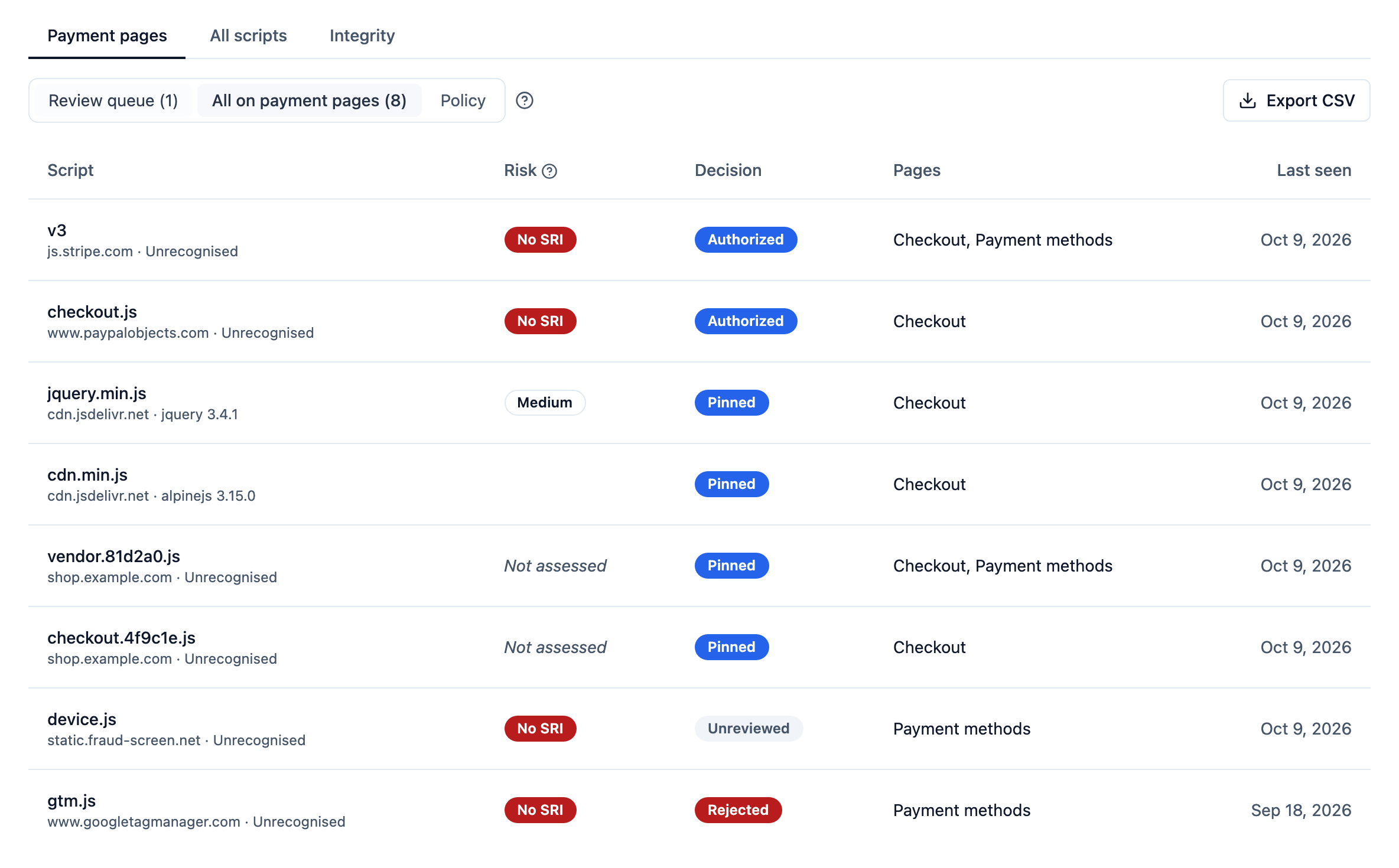
Which of them the browser is checking
"Integrity is assured" is a separate question. Add Integrity-Policy-Report-Only and Chrome and Edge report every script they load without Subresource Integrity metadata. HeaderHawk marks each script unprotected, protected or unknown, and flags the inferences. Protected, for example, means the site reported gaps elsewhere and never named this script. It does not write integrity attributes into your tags, but for a script browsers reported with a single hash it gives you the attribute to paste. On the Team plan and above, with the inventory.
Authorization has two halves. The record is the decisions above. The enforcement is your allowlist, which the browser applies and whose text HeaderHawk stores beside every report. Rejecting a script in HeaderHawk does not stop it running.
On the Professional and Business plans, HeaderHawk writes that allowlist from the decisions. Scripts › Payment pages › Policy gives a Content-Security-Policy for your payment pages whose script-src allows each pinned version by its hash, each script authorized for any content by its URL, and nothing you rejected. It comes report-only first, with the integrity attribute each pinned script's tag needs. You serve it on those pages, and the browser blocks the rest once it is enforced. The docs say what it keeps from your own policy and what it warns about.
11.6.1
Detecting change
11.6.1 covers script contents and the page's security-impacting HTTP headers. HeaderHawk sees scripts from what browsers report and, on the Professional and Business plans, by fetching each payment page's scripts every day. It sees headers twice: from the policy every violation report quotes, on every plan, and from that daily scan.
A script is added, changed, removed or moved
On every plan, a script your policy does not allow produces violation reports, which alert through your rules like any new problem. On the Professional and Business plans, a payment page gets script alerts of its own: a script new to the site running there, a version you did not pin running under a pinned authorization, a rejected script running again, and, from the daily scan alone, a script that stops appearing or appears from another host. A move is a pairing by file name, and the alert calls it a guess. A new or changed script from browsers alerts once two different networks have reported it within a day, and a rejected one once two networks have reported it again. The daily scan alerts on the scan that finds a new or changed script. A removal takes longer: a script the scan found three times in a row alerts once it is missing from two in a row, and a page's first scan only sets the baseline.
Browser reports are passive. They see a change when a visitor loads the page, and a site over its monthly quota or daily per-site ceiling can have a new hash held until the next sighting. The daily scan bounds that for the scripts a page's HTML names, so a control that must catch a change within a set window should not rest on browser reports alone. Script authorization has the rest, including the first-day baseline and the hourly cap.
The policy changes
Every violation report quotes the policy in force. When a site starts sending a policy HeaderHawk has not seen in 30 days, it alerts on every plan, once the new policy clears the bar a new violation does: two browser families, or 20 reports. A site's first day of reports only sets the baseline. It needs violations to arrive, so a policy removed outright raises nothing there. On the Professional and Business plans, the daily scan below catches it. Policy change detection has the detail.
Your payment pages, scanned every day
Each payment page is fetched once a day, graded with the free site scanner's rubric and compared with the scan before. You get an alert when Content-Security-Policy, its report-only form, Strict-Transport-Security, X-Frame-Options, X-Content-Type-Options, Referrer-Policy or Permissions-Policy is added, removed or changed, when the grade drops, and when the page cannot be scanned three days running. The same scan hashes up to 25 of the scripts the page's HTML names. Daily is well inside 11.6.1's weekly floor. Daily header scans has the rest.
On the Professional and Business plans.
Record         Watched page
Payment page   Checkout
Subject        https://shop.example.com/checkout/
Date           2026-09-24T03:05:00.000Z
Result         Last complete scan graded A

Record         Watched page
Payment page   Payment methods
Subject        https://shop.example.com/account/payment-methods
Date           2026-09-24T03:07:00.000Z
Result         Last complete scan graded C

Record         Change detected
Payment page   Payment methods
Subject        content-security-policy changed; grade
               dropped from A to C
Date           2026-09-23T03:07:00.000Z
Result         Alerted immediately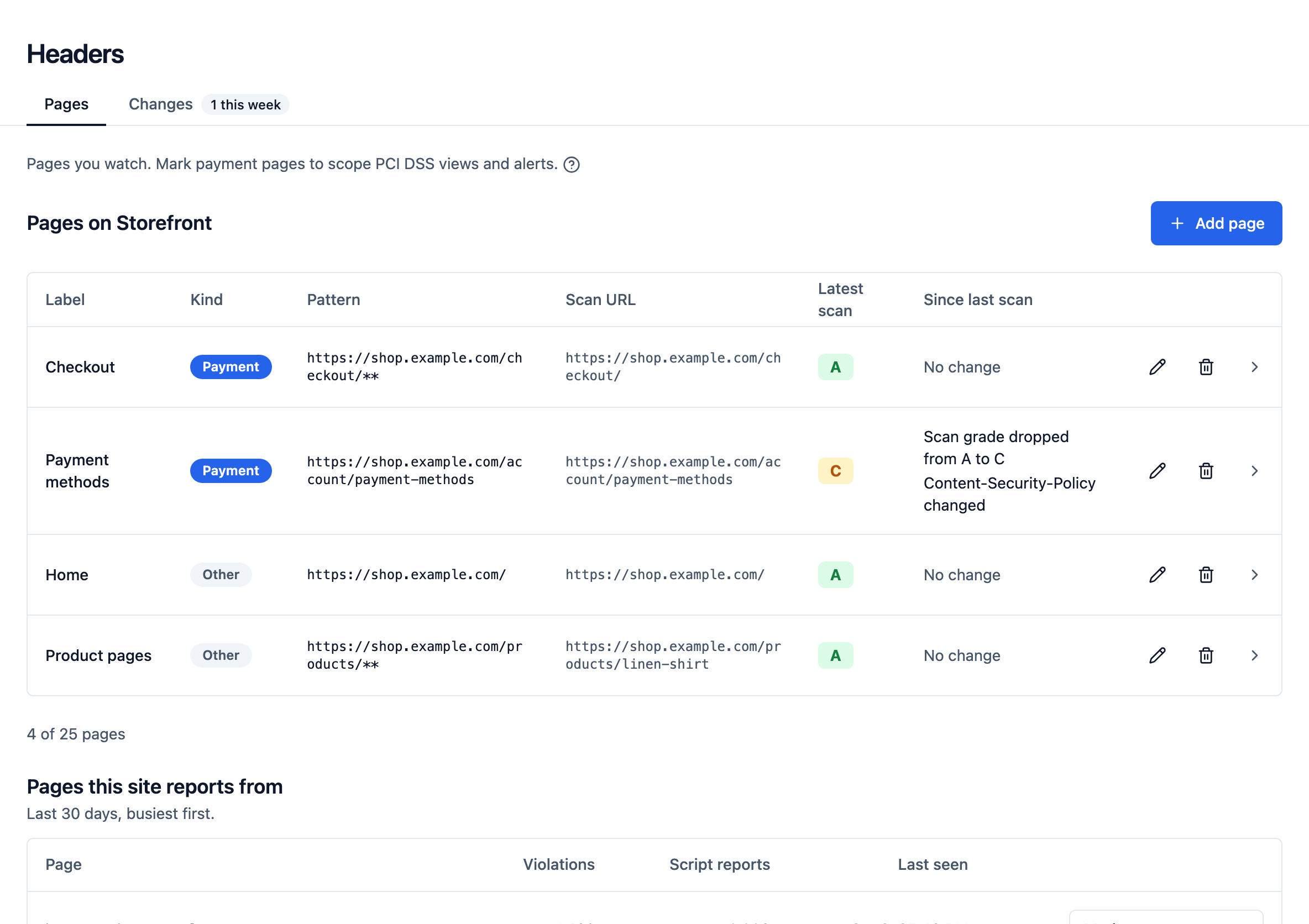
Where the alerts go
Email on every plan, and Slack or a webhook on the Team plan and above, for every site or the ones you choose, immediately or in a daily or weekly digest. Script alerts are sent immediately, except a script leaving the page and a published advisory, which can wait for a digest. Every alert sent is recorded, with whether each destination accepted it. On the Professional and Business plans, an immediate rule can be limited to your payment pages. HeaderHawk tells you what changed and when, and a person decides whether anyone meant to change it. Alerts has the full list of alert types.
Scope and limits
HeaderHawk is a monitoring tool that produces the evidence above, for you to fit into your assessment. Using it does not make anyone PCI DSS compliant, it is not a QSA-approved control, and no single tool satisfies 6.4.3 or 11.6.1 on its own. The requirement summaries on this page are our paraphrase, so read the standard itself and talk to your assessor.
Limits worth knowing before you rely on it
The dashboard and the docs carry the same caveats. An inventory you wrongly believe is complete is worse than none. Treat the Scripts view as a sample of what runs, lean on report-only violations as the broader signal, and do not let either replace knowing what you deployed.
- Hash reporting comes from Chrome and Edge only today
- Of the major browsers, only Chrome and Edge implement 'report-sha256'. Safari's support is in progress and Firefox has none. Behaviour also varies between builds (one Chrome build checked in September 2026 sent no hash reports at all), so check what your visitors' browsers do before you build a control on it. Coverage will always be partial.
- Cached scripts produce no hash
- A browser hashes a script when it fetches it, so a well-cached page reports far fewer hashes than it has scripts. On a payment page, the daily scan fills that gap for every script the page's HTML names.
- Repeat sightings are sampled
- A site's first report of a script with a given hash skips sampling. Repeats are sampled, 10% by default and adjustable per site, so counts are estimates. Skipping sampling is a priority, not a guarantee: a site over its monthly quota or its daily hash ceiling can have a new hash held back until the next sighting.
- Inline scripts are not subresources
- Hash reports describe scripts the browser fetched, so a script written inline in the page is not in the Scripts view. Report-only violations still surface it, with a snippet when your policy includes 'report-sample'.
- The Scripts view starts on the Team plan
- The Free plan has no Scripts section. The inventory starts on the Team plan, and the per-page breakdown, authorization, script alerts and the export start on the Professional plan. Report-only violation reporting, the broader of the two signals, is on every plan.
- A copy exists only if the origin still serves it
- HeaderHawk tries once, when a version first appears, to fetch the script and keep it if the bytes match what was reported. An injected payload is usually swapped in and pulled within minutes, so it is often gone by then. The dashboard shows a mismatch and keeps nothing, which means the copies most worth having are the likeliest to be missing.
- A copy is not a verdict
- A captured script is stored, not analysed. It proves these are the bytes a browser on your page reported running. HeaderHawk does not scan, deobfuscate or judge it.
- The daily scan reads the HTML and runs nothing
- The scan hashes every script a payment page's HTML names, up to 25, but does not run the page. A script another script adds, such as a tag a tag manager loads, is seen only when a browser reports it. The scan requests the page as a desktop browser would, and a vendor that serves different code to different visitors can still show it different bytes.
What HeaderHawk does not do
- It does not make anyone PCI DSS compliant, and it is not a QSA-approved or validated control. It produces evidence, and your assessor decides what that evidence is worth.
- It does not decide whether a header change was authorized. It tells you that a policy or header changed, when, and from what to what, and a person decides whether anyone meant it.
- It does not crawl your site. Scheduled scans, on the Professional plan and above, cover the pages you mark, up to 25 per site. They read the response and a payment page's scripts without running the page in a browser. On the Free and Team plans, a header change is seen only through the policy that violation reports quote.
- It does not deploy or enforce your CSP. It can propose a policy from your own traffic, and one for your payment pages from your script decisions, but a person adds it to your responses and enforces it, and HeaderHawk then shows where what runs disagrees with it.
- It records authorization and writes the policy that enforces it, but does not serve that policy. A script you reject keeps running until your site stops loading it or serves that policy enforced, and HeaderHawk alerts when it runs on a payment page again.
- It does not prove an inventory complete. The payment-page inventory lists what browsers reported and what the daily scan found in each page's HTML, and the limits above leave gaps in both.
- It does not alert on new or changed scripts outside your payment pages. Elsewhere, a new or changed script is listed in the Scripts view and alerts nobody.
- It has no configurable alert thresholds and no spike detection on violations. The only volume alert, for network errors and crashes, uses fixed numbers you cannot tune.
- It offers no export of reports. The exports are the payment-page script inventory and each requirement's evidence from the Compliance page, both CSV files. Violations and policies are reviewed in the dashboard.
See what is on your payment page
Add the headers the setup writes, in report-only mode. Nothing breaks, and reports start arriving with the next page load.