Daily header scans
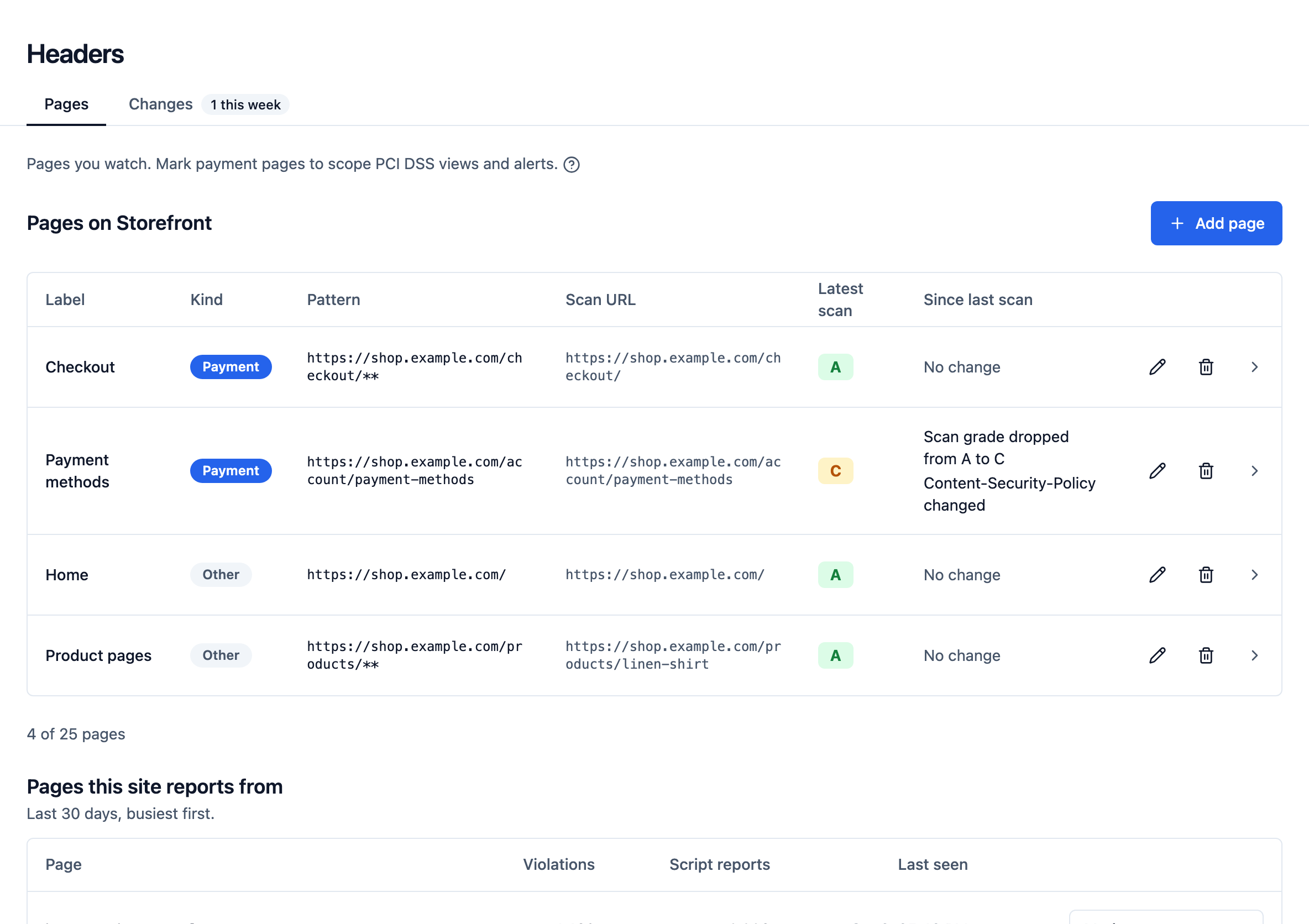
Mark the pages that matter, such as the checkout, the login and the account pages. HeaderHawk fetches each one once a day and grades it with the free site scanner's rubric. It alerts when a security header is added, removed or changed, when the grade drops, or when a page cannot be scanned three days running.
Each page keeps its scan history, so you can say, with a date, what it was sending last month.
- Plans
- The Professional and Business plans
- In the dashboard
- Headers
What's at stake
Headers disappear without a sound
A security header that stops being sent does not break the page. Nothing errors, no test fails, and the browser stops enforcing what it no longer receives.
Gone quiet
A policy that stopped being sent sends no reports
A cache rule, a rollback or a new proxy drops the Content-Security-Policy. Violation reports stop arriving, which looks just like a good week.
Infrastructure drift
The new load balancer forgot HSTS
Headers are often set by the layer in front of the application. Replace that layer and its headers go with it, while the application's own tests stay green.
Required on payment pages
11.6.1 asks for exactly this
PCI DSS 4.0 requirement 11.6.1 asks for a mechanism that detects unauthorized modification to a payment page's security-impacting HTTP headers, and alerts, at least weekly.
What it does
One fetch per page, every day, and a record of each
The headers that matter, and only those
A scan reads the response headers and grades them. Seven are watched for change. Watching every header would flag a change on every scan, from dates, request ids and CDN debugging headers, and alerts nobody can act on train people to ignore the real ones.
Policy headers are compared the way policy change detection compares them, so a fresh nonce on every response is not a change.
Content-Security-Policy
Content-Security-Policy-Report-Only
Strict-Transport-Security
X-Frame-Options
X-Content-Type-Options
Referrer-Policy
Permissions-Policy
A grade, and why it is capped
Every scan is graded with the rubric the free site scanner uses, published on the docs site. A dropped grade alerts with the grade before and after, and the scan's findings say what to change.
Three alerts, each linking to the scan that raised it
A watched header added, removed or changed. A grade that dropped. A page that could not be scanned three times in a row, which matters on a checkout. Each goes through the same rules, destinations and digests as every other alert, and the Headers section keeps every scan that recorded a change, newest first.
Checkout: Strict-Transport-Security is no longer sent
Checkout: scan grade dropped from A to C
Account: Content-Security-Policy changed
Basket: could not be scanned 3 times in a row
On a payment page, the scripts too
On a page marked as a payment page, the scan also fetches up to 25 scripts its HTML names, from any public host, and records their hashes in the script inventory. That covers the scripts browsers cannot hash. It also decides when a script has left a payment page, from the scan's own lists and never from browsers going quiet.
The 11.6.1 answer
The dashboard's Compliance page reads these scans, checks that an enabled alert rule sends each kind of change somewhere, and says whether 11.6.1 is met for a site. It is a readiness view, not an attestation.
How it runs
One request per page. No crawler, no browser.
Scans and reports complement each other. Reports show what real visitors' browsers were sent on every route, and the scan shows what one marked page sends today, even when nothing reports.
- Each marked page is one URL, fetched once a day from our infrastructure. Nothing is crawled, and pages you did not mark are never requested.
- A redirect is followed only to the site's own hosts.
- No JavaScript runs. The scan reads the response headers and the initial HTML.
- Up to 25 pages a site, each with its own history.
Scope
One layer, and where it stops
A scan is one fetch from one place. It cannot see a header a CDN sends only in another region, or a variant served only to signed-in visitors. The browser's own reports cover those.
| Daily header scans do | It does not replace |
|---|---|
| Fetch each page you mark once a day and grade it | A crawler or a scan of pages you have not marked |
| Alert when a watched header is added, removed or changed | A headless browser. A script inserted by another script is seen only in browser reports |
| Alert on a dropped grade, and on three failed scans in a row | Your change review. A scan says a header changed, and whether it was authorized is for a person to decide |
| Hash the scripts a payment page's HTML names | Uptime monitoring. A failing scan alerts after three days, not three minutes |
Mark the pages that matter
Daily scans are on the Professional and Business plans, for up to 25 pages a site.