Script inventory
Add one keyword to your policy and Chrome and Edge report a SHA-256 hash of each script they fetch and run. HeaderHawk turns those hashes into an inventory by origin and by script URL. Where a hash matches a file in a published npm package, it names the package and version, so you read jquery 3.7.1 instead of a digest.
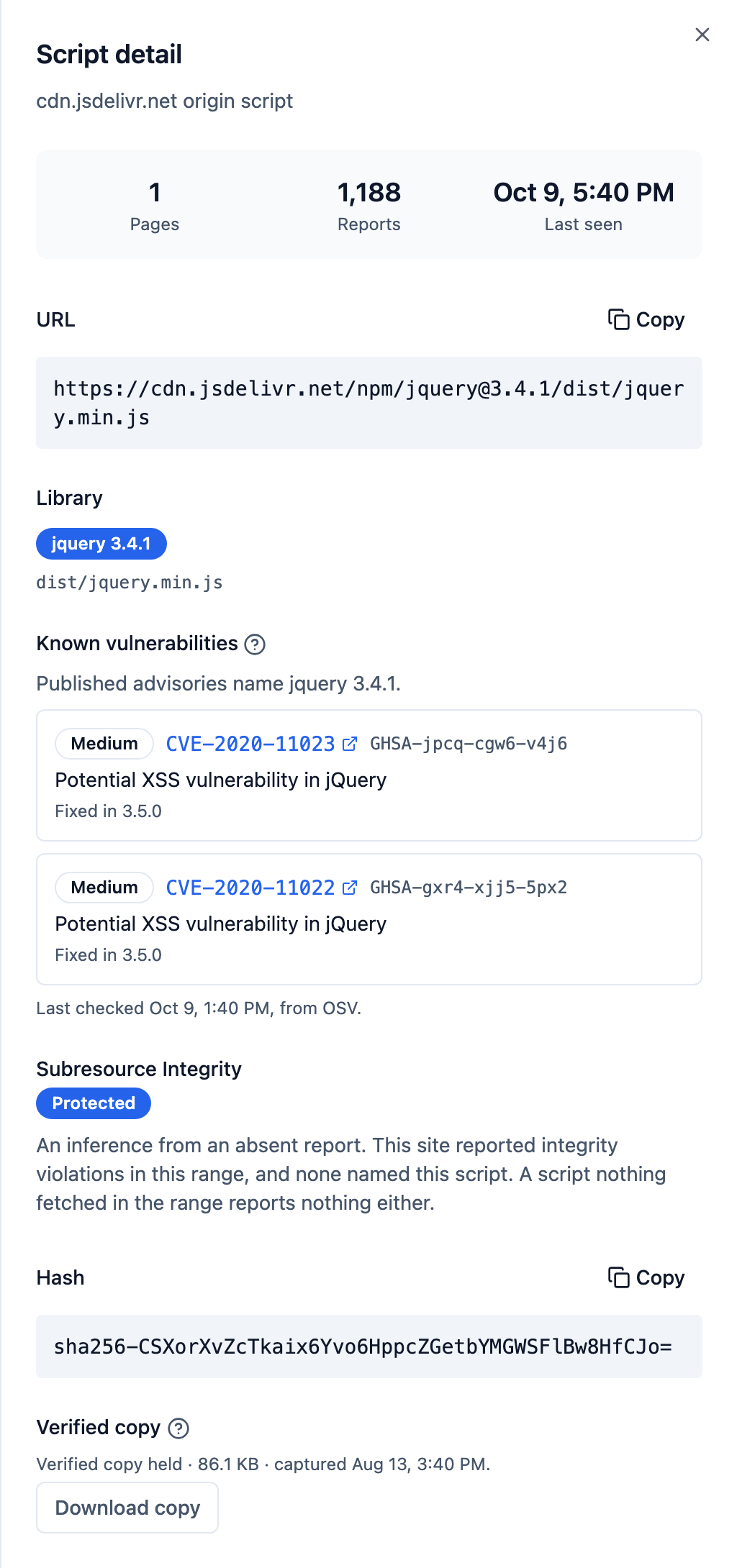
Beside each script you see whether a browser checks it with Subresource Integrity and, on the Professional plan and above, the advisories published against its version.
- Plans
- The Team plan and above; the per-page breakdown and advisories on the Professional and Business plans
- In the dashboard
- Scripts › Inventory and Integrity
What's at stake
You approved an address, not a file
A list of script URLs says where code came from. A changed vendor file, a library advisory and an assessor all ask what the code was.
Same URL
The address stays put while the contents change
A vendor ships to the same path, and a compromised host serves changed code from it. Watching the URL shows neither, because the URL never changed.
Unnamed code
You cannot patch a library you cannot name
When an advisory lands for one version of one library, finding out whether you run it means opening minified files by hand, if you can work out which ones to open.
Allowed and unseen
An inventory of refusals forgets what you allow
An inventory built from policy violations sees only the scripts your policy refused. Allow a vendor's host to quiet the reports, and the vendor leaves the inventory the moment you approve it.
What it does
From a hash to a name, a check and an advisory
A hash of what ran, from the browser that ran it
With 'report-sha256' in your script-src, Chrome and Edge send one report per script they fetch on each page load. It carries the page, the script's URL and a hash of the bytes they received, after every CDN, proxy and regional variant. The keyword allows and blocks nothing, and an allowed script reports like any other, so an allowed vendor stays in the inventory.
Scripts are listed by origin and by URL, without the query string, so a cache-busting parameter does not make a new script. A second hash for a familiar URL means that script's contents changed.
{
  "type": "csp-hash",
  "body": {
    "documentURL": "https://shop.example.com/checkout/payment",
    "subresourceURL": "https://cdn.jsdelivr.net/npm/jquery@3.7.1/dist/jquery.min.js",
    "hash": "sha256-/JqT3SQfawRcv/BIHPThkBvs0OEvtFFmqPF/lYI/Cxo=",
    "type": "subresource",
    "destination": "script"
  }
}
The library and version, named from the bytes
jsDelivr publishes a SHA-256 for every file in every npm package version it serves, the same digest a browser reports. Where a script's hash matches a published file, HeaderHawk names the package, the version and the file. The name means the bytes are identical, not just that the URL looks right.
A script reads one of four ways. Identified names it. Unrecognised means no indexed package holds those bytes, the normal, permanent answer for your own build output. Cannot be identified means the browser sent no hash. A name mismatch, where the URL asks for one package and the bytes are another's, is raised as a question, not an alarm. HeaderHawk indexes the most-requested npm packages, not all of npm, and publishes no fingerprint count.
jquery 3.7.1                          identified
  /dist/jquery.min.js
  sha256-/JqT3SQfawRcv/BIHPThkBvs0OEvtFFmqPF/lYI/Cxo=

https://shop.example.com/assets/app.js  unrecognised
  your own build output, which no package holds

https://widgets.example.net/chat.js     cannot be identified
  loaded cross-origin without CORS: no hash sent
Which scripts a browser is checking with a hash
Subresource Integrity stops a changed file running, but only on the tags somebody remembered to hash. One more report-only header asks browsers to report every script they load without integrity metadata, and each report is a gap.
The Integrity tab lists the unprotected scripts. For a script browsers reported with exactly one hash, it gives the integrity attribute to paste into its tag. It charts the daily count of unprotected scripts over 30 days. It never declares a site ready to enforce, because a quiet header and an undeployed one look the same from here. You decide from a falling count.
Integrity-Policy-Report-Only: blocked-destinations=(script), endpoints=(headerhawk)Published advisories against the version you run
A script named as a library version is checked against the advisories OSV publishes for that version, when it is first identified and every day after. Each shows its severity, the release that fixes it and a link to the source. A high or critical one raises an alert once.
The version comes from what browsers ran, so this covers the tag manager's script and a vendor's widget, which appear in no lockfile. A flag is about the version, not your page. A script that cannot be identified shows as not assessed, never as clean.
The Professional and Business plans
What the payment page's HTML names, fetched every day
The daily scan of each payment page fetches and hashes every script its HTML names, from any public host. That covers the scripts browsers cannot hash, because visitors have them cached or they load without CORS. Each script shows whether browsers, the scan or both saw it, and these are the scripts script authorization puts a decision against.
The Professional and Business plans
How it runs
Two headers. No agent, no crawler.
The setup panel writes both headers with your endpoint in them. The first adds one keyword to your policy:
Reporting-Endpoints: headerhawk="https://k3x9mp2nq7ab.ingest.us.headerhawk.com/r"
Content-Security-Policy-Report-Only: default-src 'self'; script-src 'self' 'report-sha256'; report-uri https://k3x9mp2nq7ab.ingest.us.headerhawk.com/r; report-to headerhawk- Nothing of ours runs on your pages. The browser does the hashing and posts the report.
- Reports come from real sessions, including the signed-in pages and regional variants a crawler never sees.
- Script hashes start at a 10% sample rate you can change per site. A hash seen for the first time skips the sample while the site is within its limits, so a new script is not left to chance.
- Both headers are report-only and block nothing.
Scope
One layer, and where it stops
The inventory is a sample of what browsers reported, not a census. Hash reports come from Chrome and Edge only. A cached script reports on its first load only, inline scripts send nothing, and repeat sightings are sampled. The daily scan adds every script a payment page's HTML names, but it runs no JavaScript, so a script inserted by another script is seen only when a browser reports it.
| The script inventory does | It does not replace |
|---|---|
| Lists the scripts Chrome and Edge report running, by origin and URL | A software bill of materials from your build. The inventory reads what browsers ran, not your lockfile |
| Names a script's npm package and version from its hash | Code review or malware analysis. An unrecognised script is unknown, not suspicious |
| Shows which scripts a browser is checking with Subresource Integrity | Threat intelligence feeds that score the hosts your scripts come from |
| Flags published advisories against the version a script is | Your integrity attributes and your policy, which the browser enforces |
See what ran, and what it was
The script inventory starts on the Team plan. Add 'report-sha256' to your policy and the first hashes arrive with the next page load.