Client-side security

Your servers have layers of controls.Your visitors’ browsers have almost none.

HeaderHawk is a client-side security platform built on controls browsers already enforce. No agent, just send security headers, and get alerted when an unapproved script shows up on your site or your policy changes.

  • Free for 1 site and 25,000 reports/month
  • No credit card
  • Response headers, no agent
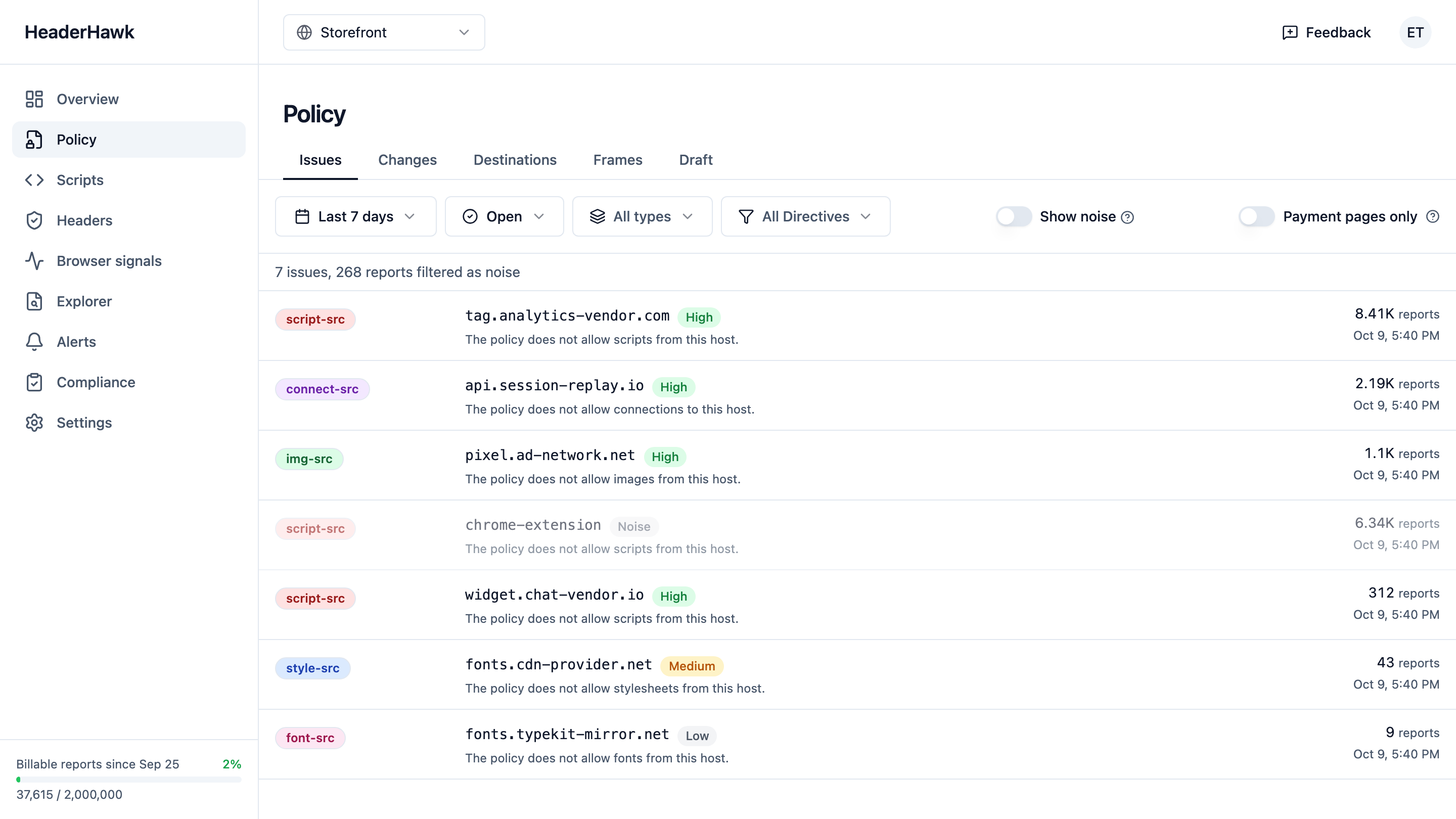
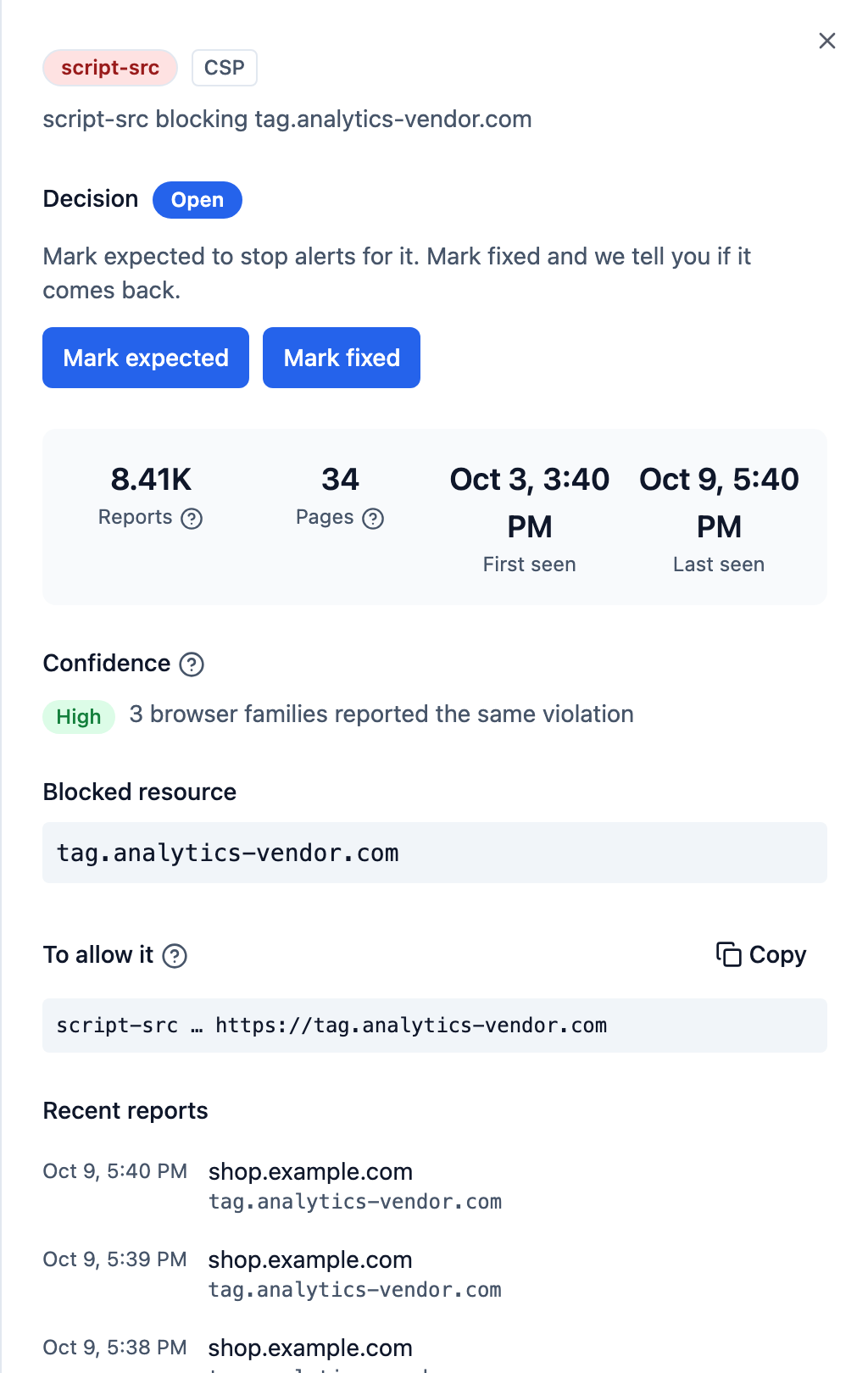
The HeaderHawk issues view: seven CSP violations on one site, one row per problem. Each row names its directive, the blocked host, what the policy refused, a confidence level and the report count, and the line above the list counts the reports filtered as noise.The detail panel one of those rows opens: 8.41K reports across 34 pages, rated high confidence because three browser families reported it, the blocked resource, and the individual reports behind the group.
One row per problem, not per report. Open a row for the pages it affects, the browsers that reported it, and the reports themselves.

How it works

The browser does the work. HeaderHawk reads what it reports.

  1. Your server

    sends response headers

    The setup writes the headers for the report types you switch on. Paste them where you set headers today.

  2. The browser

    enforces your policy

    Start in report-only mode, which blocks nothing, and enforce once the reports are clean.

  3. …and posts a report

    of what it refused or ran

    From your visitors’ browsers, in the background, straight to HeaderHawk.

  4. HeaderHawk

    groups them into issues

    Thousands of reports become a short list, noise set aside. You get an alert when a new problem or policy appears.

Nothing on your pages. No agent, no proxy, nothing in your visitors’ request path.

Setup guides for every common web server and host are in the docs.

We run it on ourselves

headerhawk.com enforces a strict policy that reports to HeaderHawk. Grade headerhawk.com with our free scanner.

What client-side security means here

See it, control it, prove it

Your policy controls and the browser enforces. HeaderHawk shows you what happened, in a form a developer can act on and an assessor can follow.

See

What runs in the browser

  • CSP violations and every other report browsers send, from integrity and cross-origin policies to deprecations, network errors and crashes. Every type on every plan, each with its own sample rate.
  • Reports grouped into a short list that opens onto the file, line and script sample, with extension and bot noise kept out of alerts.
  • On the Team plan and above, the scripts your visitors’ Chrome and Edge browsers ran, with a fingerprint of each.

Control

With the policies browsers enforce

  • Your Content-Security-Policy, Integrity-Policy and Permissions-Policy, with nothing in your request path.
  • Start in report-only mode and fix what it reports. You see what the policy would block before it blocks anything.
  • An alert, on every plan, when a new policy shows up in your reports.

Prove

That the controls held

On the Professional and Business plans

  • Mark your payment pages, authorize or reject each script on them with a written reason, and export the inventory as CSV.
  • An alert when a new, changed or rejected script runs on a payment page, once two networks report it or the daily scan finds it.
  • Daily scans of the pages you mark, with an alert when a security header changes or the grade drops.

Everything by plan is on the features and pricing pages.

In the dashboard

What the Professional and Business plans add

A record of what runs on your payment pages, a daily check of the headers that protect them, and the evidence an assessor asks for.

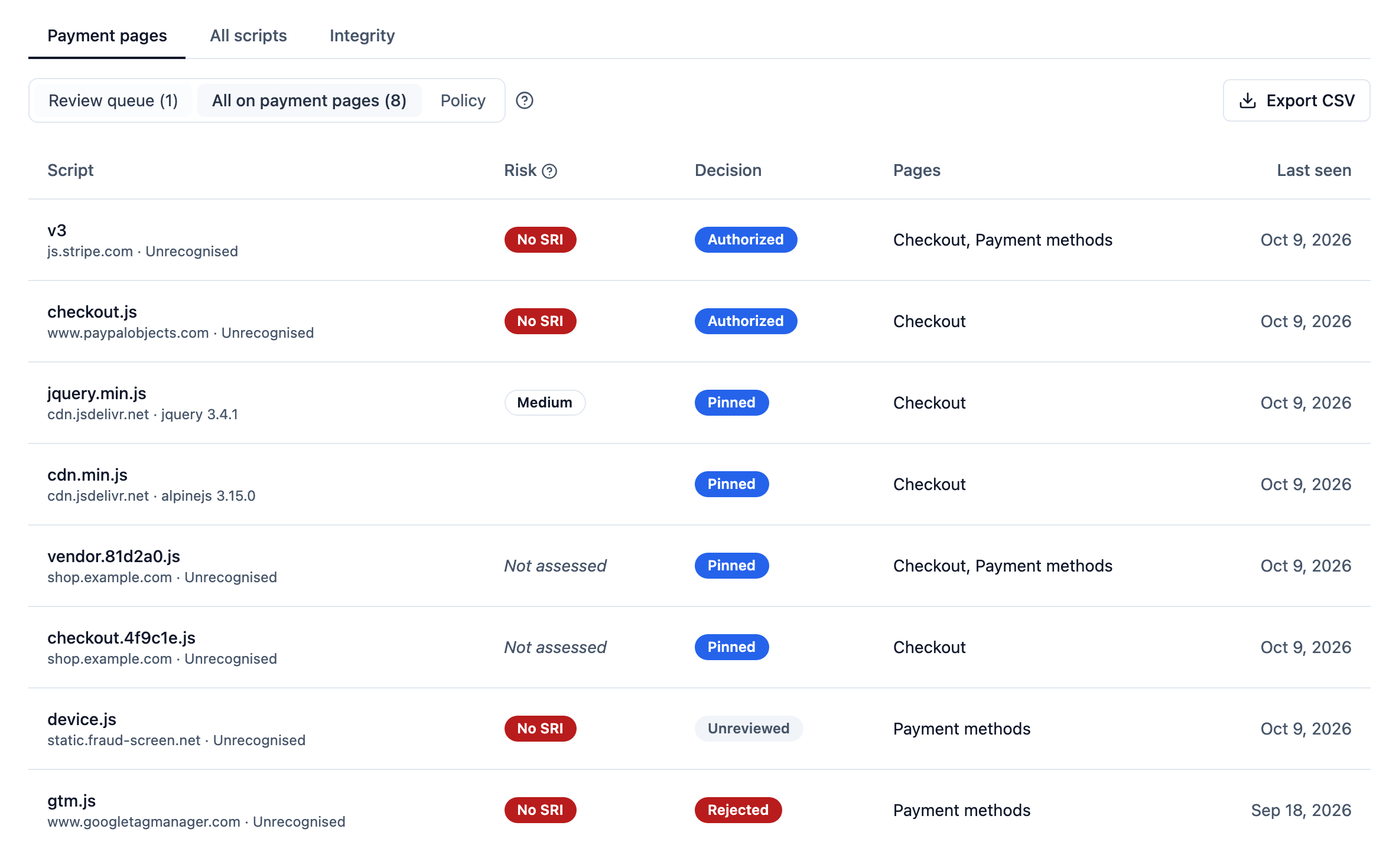
Scripts › Payment pages, on the Professional and Business plans: eight scripts on a shop's Checkout and Payment methods pages, one row each with its risk, its decision, the pages it ran on and when it was last seen. Six are authorized, four of them for their pinned hashes only, one awaits review and one, a tag manager, is rejected. jQuery 3.4.1 is identified from its bytes and marked Medium for its advisories, Alpine.js 3.15.0 has none known, and four scripts are marked No SRI because a browser loaded them with no integrity check.
In the dashboard: Scripts › Payment pages

Payment-page script authorization

The scripts browsers and the daily scan find on your payment pages. Each shows who authorized or rejected it and why, its pinned versions, and whether a browser checks its integrity.

On the Professional and Business plans.

How script authorization works
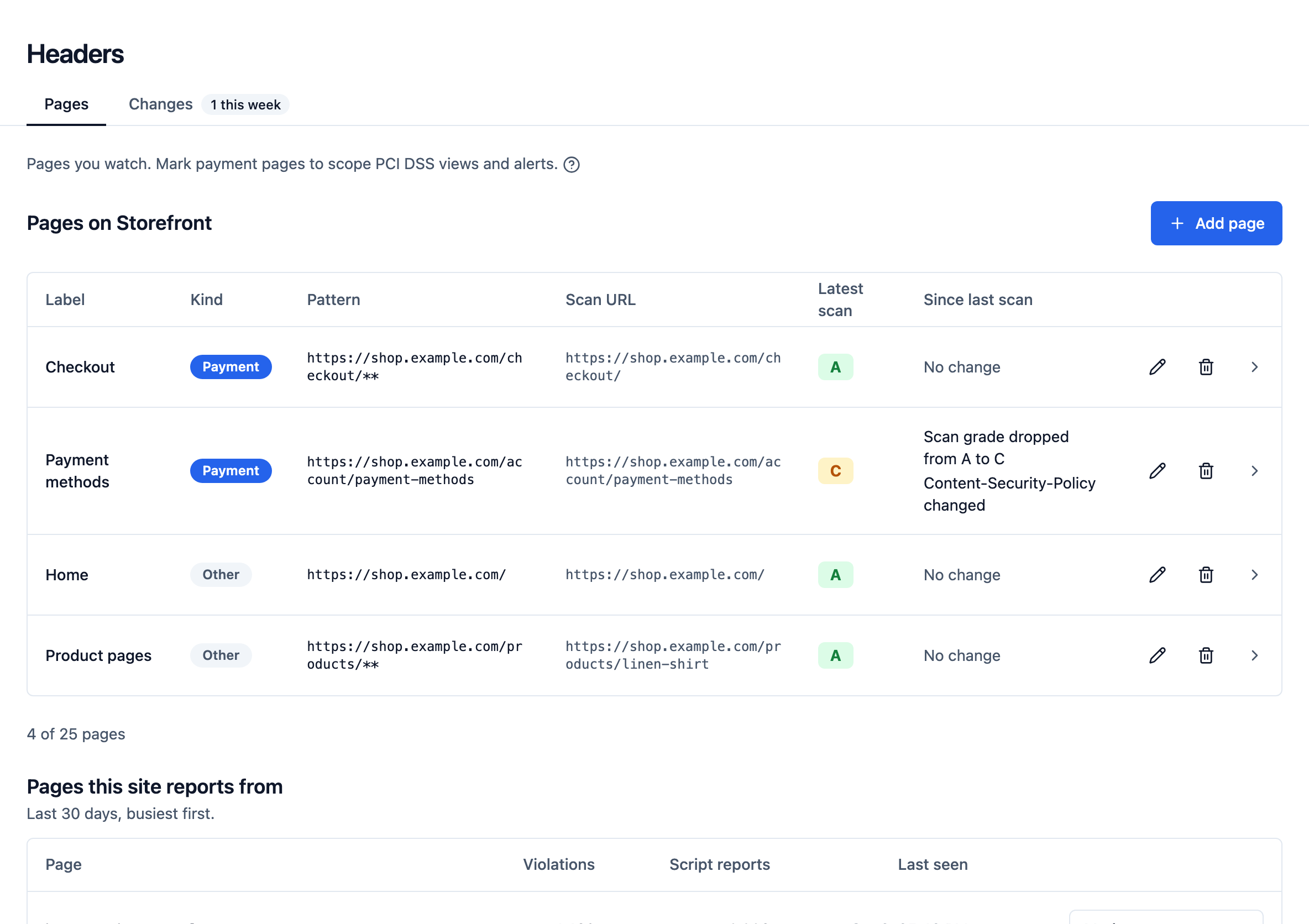
Headers › Pages, on the Professional and Business plans: four pages of one shop marked for daily scans, each with the grade of its latest scan. Payment methods dropped from A to C when its Content-Security-Policy changed; Checkout, Home and Product pages hold an A with no change.
In the dashboard: Headers

Daily header scans

Your marked pages, scanned daily and graded with the site scanner's rubric. See what changed since the last scan, and get an alert when a watched header changes or the grade drops.

On the Professional and Business plans.

How header scans work
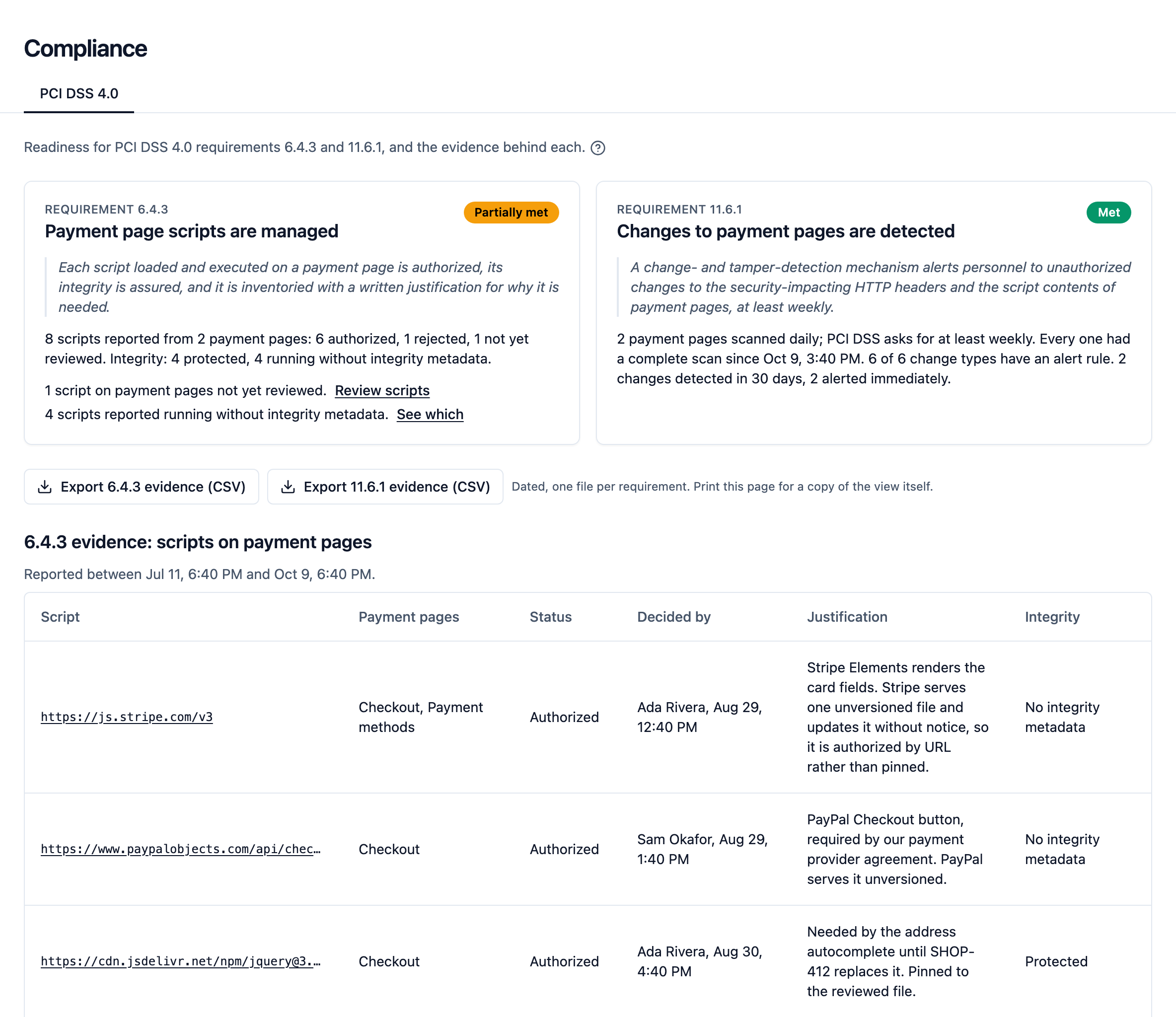
Compliance › PCI DSS 4.0 for one shop: requirement 6.4.3 partially met, with one script not yet reviewed and four running without integrity metadata, and 11.6.1 met, with both payment pages scanned daily and each change type covered by an alert rule. Below, each script's decider and written justification. The readiness view is on every plan; the payment-page evidence it reads comes with the Professional and Business plans.
In the dashboard: Compliance › PCI DSS 4.0

PCI DSS 4.0 readiness

Requirements 6.4.3 and 11.6.1 for one site, each marked met, partially met or not met from those records, with the facts and what is missing. A readiness view, not an attestation.

The readiness view is on every plan; the payment-page evidence it reads comes with the Professional and Business plans.

What HeaderHawk covers for PCI DSS

Compliance

PCI DSS 4.0: where the browser layer is required

Browser controls belong in any team’s defence in depth. With card data, they are required. PCI DSS 4.0 requirements 6.4.3 and 11.6.1 ask you to inventory and authorize the scripts on payment pages, and to detect changes to them and to the security headers the browser receives.

A CSP with reporting is the browser-native way to do that. HeaderHawk keeps the report history an assessor asks for, and adds:

  • On the Team plan and above, an inventory of the scripts that loaded, by hash, with the library and version where we can name it. A changed script shows up under a new hash.
  • On the Professional and Business plans, the pages each script ran on, and who authorized each payment-page script and why.
  • On those plans, an alert when a new or changed script on a payment page has been reported from two networks or found by the page's daily scan, and when that scan stops finding a script or finds it on another host.
  • On the same plans, a daily scan of the pages you mark for header changes and, on a payment page, the scripts it loads.
How HeaderHawk maps to 6.4.3 and 11.6.1

Works with your stack

Integrate HeaderHawk with the tools you already use.

Slack

Violation and policy-change alerts in the channel your team already watches. One rule covers every site, or just the ones you pick, sent immediately or rolled into a digest.

Webhooks

Every alert as JSON to any endpoint, violations and policy changes alike. Route it to your SIEM, ticketing, or whatever you’ve built.

Email digests

A daily or weekly summary of what changed, so you don’t have to open the dashboard to check on a quiet site.

Want something else? Tell us what you need.

Free to start, priced in the open

A free plan with no end date, and every self-serve price published.

  • Free

    For trying HeaderHawk on a real site.

    $0

    Free forever, no card

    • Sites1
    • Reports/month25k
  • Team

    For a team rolling out a policy.

    $49/mo

    30-day free trial, no card

    • Sites5
    • Reports/month500k
  • For PCI DSS

    Professional

    For payment pages under PCI DSS 4.0.

    $199/mo

    30-day free trial, no card

    • Sites25
    • Reports/month2M
  • Business

    For agencies and companies with many sites.

    $399/mo

    30-day free trial, no card

    • Sites75
    • Reports/month10M

Compare every plan

Why we built it

We defend the servers in depth. The browser gets almost nothing.

HeaderHawk comes out of years of running platform engineering, IT operations and security for a health insurer. The servers had every control you would expect, layer on layer: firewalls, scanning, logging and review. The same code then shipped to our users’ browsers, next to our vendors’ scripts, with almost nothing around it.

The controls exist. They are response headers, and the browser enforces them. What was missing was a way to read what they report. Every policy rollout drowned in browser-extension and bot noise, and the tools on offer made it hard to see what was broken.

So we built HeaderHawk to treat the browser as part of your environment, and to turn its reports into something a team can act on.

About HeaderHawk

Client-side security, answered

What is client-side security?
Client-side security is the part of your defence that covers code running in your visitors' browsers, your own scripts and the third- and fourth-party scripts beside them. It means knowing what runs there, controlling it with policies the browser enforces, such as a Content-Security-Policy, and showing that those policies held. HeaderHawk does it with the reports browsers already send.
Why doesn't my WAF cover this?
A WAF inspects requests to your servers, and a skimmer in a compromised vendor script never sends one. It runs in the visitor's browser, reads the page and posts what it finds to someone else's server. Your SIEM reads server logs and your code scanner reads your repository, so neither sees it either. Only the browser can report it, and it does once your policy asks.
Does HeaderHawk add a script to my pages?
No. You add response headers, and the browser checks your pages against the policies they set and reports what it found. The policies only report until you choose to enforce. Nothing loads from HeaderHawk into your pages, and there is no agent to install.
What happens to my site if HeaderHawk is down?
Nothing your visitors would notice. The browser enforces your policy on its own and sends reports in the background, so the page never waits on HeaderHawk. If our endpoint does not answer, those reports are lost and the page is unaffected.
Which browsers send which reports?
Chrome, Edge, Firefox and Safari all send CSP violation reports. The script hashes the inventory is built from come from Chrome and Edge, with Safari's support in progress and none in Firefox. Of the major browsers, only Chrome and Edge send network error and crash reports. So the script inventory shows what your Chrome and Edge visitors ran, not everything that ran.
Is there a free plan?
Yes, with no card and no end date. The Free plan covers 1 site and 25k reports a month, with every browser report type and policy change alerts. Every paid plan has a 30-day trial that needs no card either.

The long answer to the first one: what client-side security is, every control browsers enforce, and what a WAF and a SIEM cannot see.

Put controls on the code you ship to the browser. Start free.

The Free plan covers 1 site and 25k reports a month. The Team plan is $49 a month for 5 sites, 500k reports, and Slack alerts. Every paid plan starts with a 30-day trial.